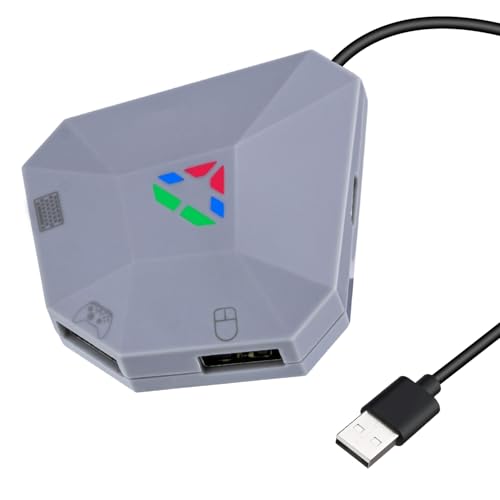

Wigearss Adapter Mouse Keyboard Converter for NS Switch, PS4, PS3, Xbox Series X/S, One, One X/S

Prices from
13.99

Featured

COMPARE ALL WEBSHOPS (2)

Description

Amazon The device uses the original game controller as a "guide" and can set each key on the keyboard and mouse as one button of the controller. Download the configuration to adjust the buttons to your taste on the console you want, and you can even adjust the mouse sensitivity. Compatibility This product is widely compatible with multiple popular gaming platforms, including NS Switch, PS3, PS4, Xbox ONE, Xbox ONE S/X, Xbox Series S/X and PC. For PS4, Xbox One and Xbox Series consoles, the original controller can be easily used to quickly assign the key assignment and start a smooth gaming journey. Indicator Light The host connection indicator is bright orange, the auxiliary current indicator is bright red, the keyboard/mouse connection indicator is bright blue, and the controller guide connection indicator is bright green. After connecting to the port, the corresponding indicator light will light up. Connection cable and port function: USB cable, used to connect to the game console. USB controller port, used to connect the original game controller (wired connection). USB keyboard/mouse port, used to connect a keyboard or mouse (wired connection). Type-C port, used for external power supply (auxiliary current). EASY TO CARRY The mouse/keyboard converter adopts novel exterior design with a stylish and simple appearance, compact and lightweight, easy to carry and flexible to place, providing users with a more efficient and comfortable user experience. Durable & Sturdy Made of ABS material, which is shockproof and abrasion resistant, and not easily deformed after prolonged use. IMPORTANT USE NOTE To ensure proper functionality, one-time authentication with the original controller is required when connecting to the PS4 and Xbox One / Xbox Series X/S platforms for the first time. PS4: First connect the USB cable to the USB port of the PS4. The connection is successful when the orange indicator light is continuously on. Then connect the keyboard and mouse to USB ports 1 or 3. The indicator light turns blue once the devices are connected. Then connect the original PS4 controller to the USB port 2 for setup. The green indicator light will light up once the connection is successful. Setup is complete and ready to use. Xbox One/Xbox Series: First connect the USB cable to the USB port of the Xbox One/Xbox Series. The connection is successful when the orange indicator light is continuously on. Then connect the keyboard and mouse to USB ports 1 or 3. The indicator light turns blue once the devices are connected. Then connect the original Xbox One/Xbox Series controller to the USB port 2 for setup. The green indicator light will light up when the connection is successful. Setup is complete and ready to use., Platforms: Nintendo Switch

Compare webshops (2)

Shop
Price
 13.99
 13.99
Description (1)

The device uses the original game controller as a "guide" and can set each key on the keyboard and mouse as one button of the controller. Download the configuration to adjust the buttons to your taste on the console you want, and you can even adjust the mouse sensitivity. Compatibility This product is widely compatible with multiple popular gaming platforms, including NS Switch, PS3, PS4, Xbox ONE, Xbox ONE S/X, Xbox Series S/X and PC. For PS4, Xbox One and Xbox Series consoles, the original controller can be easily used to quickly assign the key assignment and start a smooth gaming journey. Indicator Light The host connection indicator is bright orange, the auxiliary current indicator is bright red, the keyboard/mouse connection indicator is bright blue, and the controller guide connection indicator is bright green. After connecting to the port, the corresponding indicator light will light up. Connection cable and port function: USB cable, used to connect to the game console. USB controller port, used to connect the original game controller (wired connection). USB keyboard/mouse port, used to connect a keyboard or mouse (wired connection). Type-C port, used for external power supply (auxiliary current). EASY TO CARRY The mouse/keyboard converter adopts novel exterior design with a stylish and simple appearance, compact and lightweight, easy to carry and flexible to place, providing users with a more efficient and comfortable user experience. Durable & Sturdy Made of ABS material, which is shockproof and abrasion resistant, and not easily deformed after prolonged use. IMPORTANT USE NOTE To ensure proper functionality, one-time authentication with the original controller is required when connecting to the PS4 and Xbox One / Xbox Series X/S platforms for the first time. PS4: First connect the USB cable to the USB port of the PS4. The connection is successful when the orange indicator light is continuously on. Then connect the keyboard and mouse to USB ports 1 or 3. The indicator light turns blue once the devices are connected. Then connect the original PS4 controller to the USB port 2 for setup. The green indicator light will light up once the connection is successful. Setup is complete and ready to use. Xbox One/Xbox Series: First connect the USB cable to the USB port of the Xbox One/Xbox Series. The connection is successful when the orange indicator light is continuously on. Then connect the keyboard and mouse to USB ports 1 or 3. The indicator light turns blue once the devices are connected. Then connect the original Xbox One/Xbox Series controller to the USB port 2 for setup. The green indicator light will light up when the connection is successful. Setup is complete and ready to use., Platforms: Nintendo Switch


Product specifications

Brand Wigearss
EAN
  • 4895232027347
MPN
  • INSP0507

Featured Choice
 13.99
To Shop