


€ 78.39 € 70.56

Featured
|
|
€ 78.39
€ 70.56 |
To Shop
|

|
€ 79.19
€ 71.28 |
To Shop
|
| COMPARE ALL WEBSHOPS (2) | ||
 Description
Compare webshops (2)
€ 78.39 € 70.56
€ 79.19 € 71.28
Shops with other sizes
Description
(1)
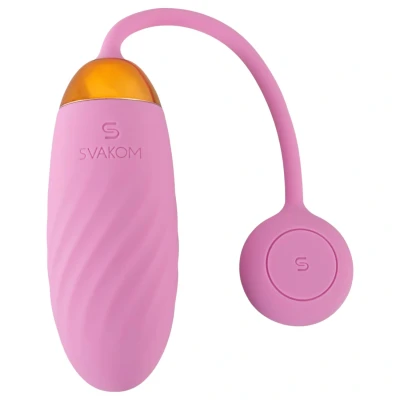
The Svakom Ella Neo smart vibrating egg (pink) is an elegant, app-controlled intimate toy that delivers powerful vibrations and intelligent functions for an exciting, fully customisable experience.Why is the Svakom Ella Neo smart vibrating egg (pink) so good?The Svakom Ella Neo smart vibrating egg is made with modern technology and premium materials to provide maximum pleasure. This compact yet powerful love egg pampers you with 11 different vibration modes, while the rippled surface enhances stimulation. The flexible retrieval cord with a stylish gold SVAKOM tag not only gives it a chic look, but also makes it easy to handle. Thanks to its fully waterproof design, it can be used in the shower or in the bath as well.KooSync is SVAKOM’s official interactive app, replacing the FeelConnect app. The new app takes your experience to the next level with real-time video synchronisation, remote control and enhanced data security. Key features: Real-time video synchronisation - the toy automatically follows the rhythm and intensity of the interactive videoRemote control - your partner can take over control from anywhereMulti-device and group connection at the same time - control up to 5 toys simultaneouslyCustomisable vibration patterns and enhanced data securityHow to use it Download the KooSync app to your phone, then pair your SVAKOM toy via Bluetooth. In the app you can customise vibration patterns, use remote control and access interactive features.Why customers love the Svakom Ella Neo smart vibrating egg (pink)Powerful yet quiet motor: discreet operation with intense pleasure.11 different vibration modes: varied stimulation every time.Smart app control: operate it from your phone or from a distance.Create unique vibration patterns: a fully personalised experience.Rippled surface: extra stimulation for the vaginal wall.100% waterproof design: can be used in the shower or bath.Flexible retrieval cord: safe and comfortable removal.Elegant design: gold SVAKOM tag and premium finish.Built-in battery: USB rechargeable, no batteries required.Complimentary storage pouch: practical and discreet storage.What’s in the box?1 × Svakom Ella Neo smart vibrating egg (pink)1 × USB charging cable1 × storage pouchProduct featuresDesign: oval vibrating eggVibration modes: 11App control: KooSync compatibleWater resistance: 100% waterproofTotal length (with tail): approx. 21 cmEgg size: approx. 8.2 × 3.3 cmColour: pinkMaterial: eco-friendly ABS and soft silicone (EU regulation compliant, phthalate-free)Power supply: built-in batteryCharging: via USB charging cableSurface: rippled, stimulating textureInstructions for useSVAKOM Bluetooth toys can be controlled with two free apps (iPhone and Android): the SVAKOM App and the KooSync App. Pairing is simple with both, and for most functions you don’t need to register.Step-by-step Bluetooth pairing (SVAKOM App):Download the SVAKOM App for free from the App Store (iPhone) or Google Play (Android).Fully charge the toy before first use - a low battery is the most common cause of connection issues.Switch on Bluetooth on your phone.Open the SVAKOM App and allow the requested permissions (Bluetooth and location, if asked).Switch on the toy and hold it close to your phone - the app will automatically find and connect to it.You don’t need an account for solo use. For Remote Control and Group Mode you must log in, for secure sharing.Once connected, choose from the modes: Preset (pre-set patterns), Music, Sound, Touch and Custom (your own pattern), as well as partner remote control.Bluetooth pairing with the KooSync App:Download the KooSync App to your phone or tablet; for a larger screen you can also use the KooSync Chrome extension on PC.Switch on Bluetooth, open the KooSync app, allow the permissions, then switch on the toy - it will connect automatically within a few seconds.KooSync provides real-time, lag-free synchronisation and also offers video sync: it matches the toy frame-perfectly to interactive video content.It supports long-distance connections with up to 100 users, and can control or sync two toys at the same time.If the toy won’t connect (for either app):Check that the toy is charged and compatible with the app.Make sure Bluetooth is switched on and you’ve granted the necessary app permissions.Close and reopen the app, and toggle Bluetooth off and on again in your phone settings.Disconnect any other device that might be connected to the toy, and do not select Guest access before pairing.If it still won’t connect, restart your phone or reinstall the app.Good to know: the connection may drop when you answer an incoming call - you can reconnect after the call. Most toys switch off automatically after 30 minutes of inactivity. Group Mode and video sync work best with a stable internet connection.Charging connectionThe charging port is on the back of the love egg, just above the DC marki
 Product specifications
| Brand | SVAKOM |
|---|---|
| EAN |
|
| Material |
|
| Color |
|
| Size |
|
| Gender |
|
 Price History
 Prices were last updated on:
 Related results


