


€ 45.03

Featured
|
|
€ 45.03 |
To Shop
|

|
€ 45.49 |
To Shop
|
| COMPARE ALL WEBSHOPS (2) | ||
 Description
Compare webshops (2)
€ 45.03
€ 45.49
Shops with other sizes
Description
(1)
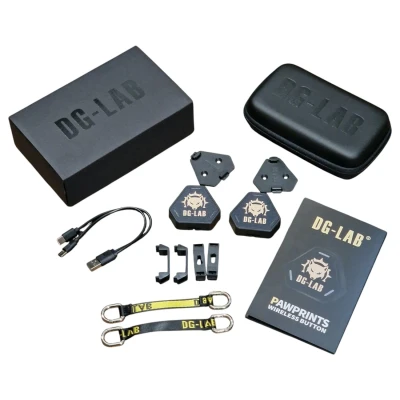
One press of a button, one movement or one tightening strap and the Coyote 3.0 reacts instantly: the game turns into a challenge full of rules.Why is the DG-LAB PawPrints wireless sensor button so good?PawPrints is a wireless sensor that connects directly to the DG-LAB Coyote 3.0 controller. It detects button presses, tilt angle, acceleration, and - with the straps - pulling force as well. The Coyote responds to these signals in a pre-set way. This allows you to punish movement, or reward keeping the button continuously pressed. There are two buttons in the pack, so you can set up two rules at the same time.Why customers like the DG-LAB PawPrints sensor buttonNew play modes: posture training, stillness game, reaction-time test and random start.Multiple sensing options: pressure, tilt angle, acceleration and pulling force in a single device.No annoying cables: the buttons communicate wirelessly with the controller.Two buttons in one pack: you can set two separate rules or involve two participants.Mountable: with the wall mounts and straps, the buttons can be fixed to a wall or a holder.Durable switch: a microswitch designed for many presses operates inside the button.Clear feedback: coloured indicator lights show the current status.Contents of the pack2 × DG-LAB PawPrints wireless sensor buttons (black)1 × zip-up hard storage case1 × charging cable (USB-A - 2 × USB-C)2 × pulling-force sensor straps2 × plastic wall mountsProduct characteristicsBrand: DG-LABType: wireless sensor button for electrostimulation controllerPack size: 2 pcsColour: blackMaterial: plasticSensing: pressure (microswitch), tilt angle (3 axes), acceleration, pulling forceConnection: Bluetooth, directly to the controllerCharging: USB-CCompatibility: DG-LAB Coyote 3.0 onlyHow to useCharge the buttons, then pair them with the Coyote 3.0 controller. In the app, select the play mode and set what the device should react to. After that, the buttons communicate directly with the controller.Points to note when using the DG-LAB PawPrints sensor buttonImportant: the sensor button does not provide electrostimulation on its own; it can only be used together with the DG-LAB Coyote 3.0 controller and the DG-LAB app, and not with devices from other brands. The controller is not included in the pack.The impulse may arrive unexpectedly, so set a low initial intensity in the app.The usual rules of electrostimulation apply here as well: do not use it if you have a pacemaker, an implanted device, or if you are pregnant.Drawback: operating time depends on how frequently it is used; fully charge the buttons before longer sessions.Cleaning instructionsWipe the buttons with a soft, slightly damp cloth. Do not immerse them in water. After use, put them back in the case and store in a dry place.User manual
 Product specifications
| EAN |
|
|---|---|
| Gender |
|
 Price History
Prices were last updated on:
 Related results


