

€ 43.68

Sponsored links
|
|
€ 43.68 |
To Shop
|
| COMPARE ALL WEBSHOPS (1) | ||
 Description
Compare webshops (1)
Sponsored links · Some shops pay us a fee
€ 43.68
Shops with other sizes
Description
(1)
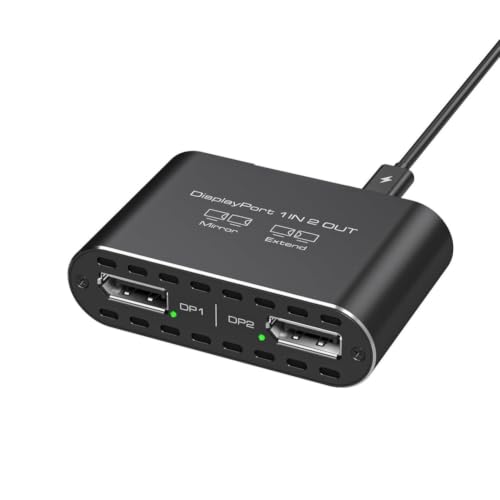
Mirror and expansion modes:On ,enjoy both extend and mirror modes for multitasking or presentations, while macOS supports only mirror mode.For 4K60+4K144Hz or dual 4K120Hz output, a graphics card with DisplayPort 1.4 is required. In some PCs, please manually set resolution and display mode and DP 1.4-compliant cables to avoid flicker. Broad compatibility note: This DP to Dual DP adapter works with native DP ports on select PCs and graphics cards such as A- ExpertCenter, SER8/SER9/SER5, De-ll , H-P EliteDesk, In- NUC 12 Enthusiast, series, AM-D Radeon RX7000/6000, AAEO-N -A750E, In- Arc A750/A770/A680, NVI-DIA /GTX. DP splitter for 2 monitors:This DisplayPort to dual DisplayPort adapter converts one DP signal into two DP outputs for unidirectional transmission from a single DP source to two DP monitors. Requires a graphics card with DP 1.2 or above and DP 1.4 or higher cables within 1 m for stable 4K output. supports extend and mirror,macOS only mirror. 4K Ultra HD visual quality: The DisplayPort splitter 1 in 2 out supports up to 4K 120Hz (3840 x 2160) on compatible devices. Single output supports up to 4K60Hz, backward compatible with 2K120Hz/60Hz and 1080P120Hz/60Hz. Dual output supports up to 4K60Hz/30Hz when all devices share the same resolution. Use DP 1.4 cables ≤1.8 m for best clarity. Simple plug and play setup: No driver or software required. The splitter has no fixed input cable, allowing you to choose DP cables of suitable length. Requires direct connection to a native DP port on the computer and a properly connected USB-C power cable. DP cables are not included.
 Related results
 Product specifications


